

Summary
Environment
DocuSign eSignature
Solution
All use of the VCU DocuSign domain accounts is solely for legitimate VCU business. Additional information may be found in the article: DocuSign - I received a Violation of DocuSign System Use.
There are two methods of accessing the History and Certificate of Completion.
Method 1: From the envelope's Details page in your DocuSign account:
- Click More, History, to review the History of events.

- At the bottom of the History window, click the Download Certificate button to download and review the Certificate of Completion.

Method 2: From the link in a DocuSign email notification:
- After clicking the link to the document in an email notification, click the kebab icon in the upper right, and click View History to review the History of events, and View Certificate to review the Certificate of Completion.

Additional Information
For example, this document appears to have been signed in DocuSign by three individuals:

However, in reviewing the History of this envelope, DocuSign only records two individuals acting upon the envelope:

There is no record in the History of Tom D Smith acting upon this envelope.
The Certificate of Completion records that there are only two signatures on the document and provides an image of each of those signatures, as well as the internal ID associated with that signature. The Certificate also includes the university's billing address for the VCU DocuSign domain account.

In the Electronic Record and Signature Disclosure portion of the Certificate (which is typically only included the first time a signer agrees to the electronic signature disclosure), DocuSign records that only two parties agreed to sign the document:
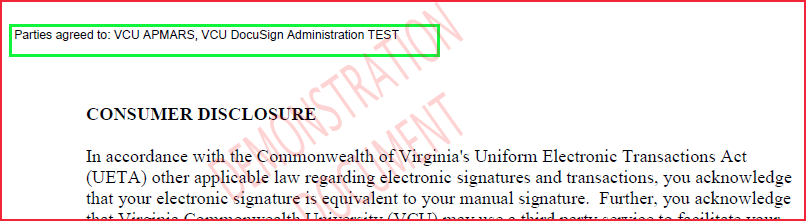
The signature of Tom D Smith III in this example is a forgery. If you receive a forged DocuSign signature, please contact your department head or the Office of University Counsel for next steps. We have seen a number of individuals send a blank document to themselves merely to gain an image of their DocuSign signature that they are then able to use in other products. However, this is merely an image of the signature, and it does not contain DocuSign's certificate, timestamps, or audit trail to prove who actually placed the signature. Anyone can copy an image of a signature and paste it into a wide variety of other applications. Without the audit trail provided in the DocuSign certificate, an image of your DocuSign signature is also considered a forgery.
In the following example, Tom D Smith III's signature was generated in DocuSign; however, the sender sent the envelope to themselves (they entered Tom's name but their own email address) and simply signed Tom's name themselves. This is also a forgery.

When in doubt regarding a given signature, always review the history and the Certificate of Completion. Again, in any legal dispute, the Certificate of Completion is the audit trail that would be required in court.
Remember that every signature on documents sent from the VCU DocuSign domain accounts is an agreement to do business with VCU:

Thoroughly review the VCU DocuSign Training Roadmap for additional information regarding the purpose and function of the VCU DocuSign domain accounts.